Huawei Mate 9 review: Positives Compact size for a large phone Porsche Design Mate 9 has a great display Excellent performance Feature-rich hardware Dual...
Nokia’s Android phones 2017: Rumors and news leaks
Nokia is back — and it’s back with a vengeance. The Finnish company finally launched its first Android-powered smartphone, the Nokia 6, but...

Showing posts with label Review. Show all posts
Showing posts with label Review. Show all posts
Monday, December 19, 2016

Saturday, December 17, 2016
Samsung Gear S3 review
$349.99
POSITIVES
Great design
Large display is the best for notifications
Rotating bezel is a joy to use
Performance is top notch
Samsung Pay works well
Plenty of features and tools make up core experience
Large display is the best for notifications
Rotating bezel is a joy to use
Performance is top notch
Samsung Pay works well
Plenty of features and tools make up core experience
NEGATIVES
Design may not suit many people
Third-party apps can be buggy
4G LTE and calls come at an added monthly price
Third-party apps can be buggy
4G LTE and calls come at an added monthly price
RATING
Battery. 8.0
Display. 9.0
Performance. 8.5
Software. 8.5
Design. 8.5

Samsung manages to make each feature in its stacked smartwatch work, making the Gear S3 one of the most enjoyable smart wearable experiences we’ve had this year.
8.5
The newest version of the Gear series is a bit bigger, packs a little more punch, and brings a few more tools for the smartwatch enthusiast. Is there enough substance behind the style? We find out in this full review of the Samsung Gear S3.
Before we begin, we will mention that while we are reviewing the Frontier edition, we were able to use the two different editions of it. A Wi-Fi only edition of the watch is available and is more or less the typical Gear experience, while the 4G-enabled edition through AT&T makes it easy use the watch without needing to have a phone nearby and connected.
Design
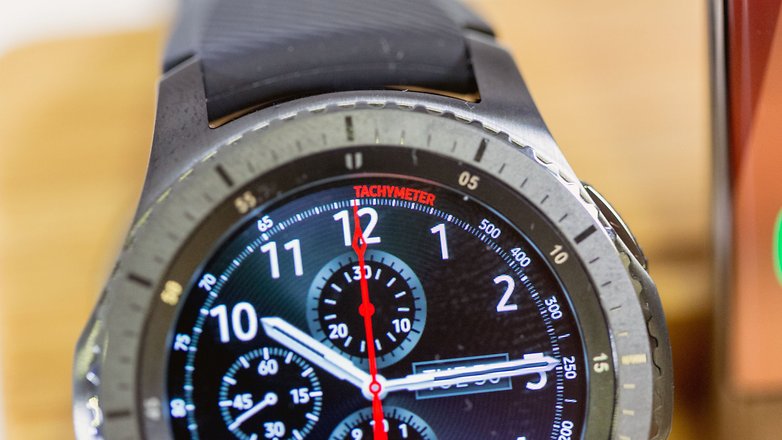
While it might not be easy for everyone to sport this large smartwatch, there is one simple reality for those who can – this is one sleek device. The Gear S3 Frontier brings grooves to the signature rotating bezel, giving it an added tactile quality that is subtle but noticeably felt. Seconds in increments of five line the area just below the rotating bezel – a small detail that adds to any analog watch face. Two buttons are on the right side, one to go backwards in the interface and the other to either go back to the watch face or open up the app list. To differentiate the Frontier and Classic editions, the Frontier’s buttons are more recessed to the body and are covered in a patterned leather.
In adding to the sporty nature of the Gear S3 Frontier, a silicone band comes standard. This helps with the watch’s water resistance, ensuring that no leather will get ruined if one’s wrist gets splashed. However, it is easy to replace the bands through the 22mm standard connectors. A myriad of bands are available from Samsung via partnerships with plenty of fashion companies, but this silicone complemented the style of the Gear S3 nicely.
The body case is a large 46mm, definitely bigger than either of the previous Gear S2models. This size makes it tough to recommend for anyone with small wrists, regardless of one’s gender. Even my own wrists could barely contain the large frame of the watch. While it certainly doesn’t look obnoxious on my wrists, it took a little bit of time to get used to. This size adds room for plenty of features and protection – turning the watch body over reveals the heart rate sensor and designations for the 316L stainless steel material that makes it up. And finally, a MIL-STD 810G rating adds extra shock, heat, and cold resistance to the existing IP certification.
also watch
also watch
Casio Smart Outdoor Watch WSD F10
What we really applaud the Gear S3 Frontier for, is its ability to work with plenty of different outfits. While it is most at home among a more formal ensemble, the sleek head-turning design makes it a centerpiece when wearing casual clothing. And to that end, it is hardly a loud device in terms of look – the black color blends in well with most paired clothing.
Which brings us to the marquee feature that returns from the Gear S2 – the rotating bezel. It takes just little tug or a little push in order to make it move, and every click from the bezel is as satisfying as the last. Full touchscreen capabilities are available still, but this physical method of moving around the Tizen interface is fluid, responsive, and as snappy as it should be. Movements far in the interface or just to the next element are equally easy, making this an ideal smartwatch for anyone that wants a tactile experience to, in many ways, replace touchscreen experiences.
Display
And the display is half the story regarding the size of the Gear S3 – at 1.3 inches, the OLED display is covered in Gorilla Glass SR+ (Scratch Resistance Plus) and boasts 360 x 360 resolution. Though these specs might sound a bit run of the mill for most high-end smartwatches, credit goes to Samsung for leveraging it as effectively as possible. OLED lends to really great colors coming from the Tizen OS along with the ability to truly turn off the display’s lighting for battery savings.
And to that end, watch faces on the Gear S3 take on a different nature when the ‘Always on Display’ option is ticked. When using pretty much any watch face downloaded from the Samsung Gear application, covering the display with one’s hand or letting it time out reveals a more toned down version of the face that still keeps the essential elements in view no matter what angle you’re looking at the watch from. For any fans of the Always on Display on the Galaxy smartphones, this is about the closest that it can get strapped onto a wrist.
In all situations – even in broad daylight – the brightness of this OLED panel keeps everything properly viewable. And it is important to have an easy time glancing at the screen because the Tizen operating system tries to pack in as much as it can in the main screen. Some watch faces have hidden functionality when tapped upon. For example, the default face doubles up as a stopwatch. Even when features like these are running, small elements are strewn about the watch face to alert the user to changing circumstances like standing notifications or when the watch is not connected to a smartphone.
Make no mistake – this is the best way to read notifications on a smartwatch. Ever. The combination of the high quality screen and the rotating bezel to scroll down in even long notifications is an experience that is unparalleled by the touchscreen-centric Android Wear and the button pressing Pebble. Even when pictures load up in the preview, they’re shown in effective fashion and simply add to the idea that this watch is supposed to be more standalone than perpetually tethered to your smartphone.
Performance
So, for a watch that wants to do as much as possible, there has to be quite a bit of power under the hood. For the Gear S3, this comes in the form of an Exynos 7270, born and optimized by Samsung and for Samsung, in the case of their own smartwatch operating system Tizen. It comes at no surprise, then, that the watch simply flies through its operating system and applications. A quick spin of the rotating bezel shows how fluidly all of the widgets and screens zip past with no issues at all.
The only problems we had with applications came from third party developed downloads from the Gear Manager. This is not so much the problem of the watch and its processing power, but from the development of the apps. While this is an issue that bears mentioning, the core experience of the Gear S3 is still about as good as it can get – and that says a lot, because this watch tries to do a lot out of the box.
Hardware
 As mentioned earlier, we have been able to use a 4G LTE enabled version of the Gear S3 that comes with a few extras. Namely, the ability to sync up the watch without needing to be around the smartphone it pairs with. Setting up the Gear Manager properly means that as long as both the smartphone and smartwatch are connected to some sort of network, notifications will come to the Gear S3, no matter where the user is.
The added benefit is the ability to make calls and send texts in this very situation, without the smartphone around. On AT&T, this service is called NumberSync and it makes it so that the watch goes off alongside its paired phone. Calls on the watch make use of a speaker and microphone combo that is found on the left side of the body, tucked under the top half of the watch. The experience of taking calls on the S3 is akin to a small walkie talkie that is strapped to your wrist, but it isn’t effective in even semi-loud environments and thus requires either a Bluetooth headset connection or, surprise surprise, moving to the phone. It’s a great idea made into reality, it’s just not as awesome as we probably all expected it to be.
Not the mention that having this extra functionality in the Frontier LTE means paying for a smartwatch plan that encompasses data and wireless signal, which costs $10 on top of any smartphone plan you are already paying for. Is it worth that extra money each month? That’s up to you, but we think that there is already so much fun to be had on the Gear S3 without having to shout at your wrist.
Connecting a Bluetooth headset to the watch opens up a couple of possibilities. Not only will calls be easier to manage, but the on-board storage can be used for local music playback. The LTE-enabled Frontier allows for Spotify streaming, which is nice but is a battery drain. 4GB of storage is available for local files so that content is always within reach.
One final feature on the Gear S3 is Samsung Pay, enabled on the Gear S3 through an add-on that is installed in the Gear Manager. The setup takes a little bit of time, but after getting any credit cards put into the add-on and then transferred over to the NFC and MST enabled Gear S3, payments are quite easy at multiple stations across major stores. Simply hold the back button, select which card to use, and then bring the watch up to the station and voila. This is yet another fun aspect to using the Gear S3, and even this skeptic that prefers physical credit cards gets a kick out of it.
The battery of the Gear S3 is charged via a wireless charging dock that is magnetic, making the watch snap right into place easily. Though Samsung claims two days of battery life out of the 380mAh unit, that is less true when usage is constant and aggressive. This is mostly true for the Frontier LTE, in which everything from taking calls, sending texts, and even fitness tracking combined will make the watch seem more like a one day warrior. When using more applications and functions on the regular, be prepared to take the watch off and dock it at least once a day to top off the battery.
Software
And lastly, Tizen – the smartwatch OS of choice for Samsung. Since the Gear S2, there have been some enhancements made to the operating system, and existing Gear S2 users will get this through an update. These are mostly in terms of using the rotating bezel, which can be rotated to answer or decline calls, for example.
The main noticeable changes are in the overall optimization of the Tizen software, and it shows in the smooth look and feel that the Gear S3 provides. Which is good, because there are a lot of apps that require some due diligence. Weather, calendar events, reminders, Flipboard, S Health, and so much more are available to the user, and it can get a little overwhelming. Add upon all that the different ways that users can respond to messages – voice, emoji, canned messages, and a T9 keyboard that is a bit easier to use on the larger screen but is still far from ideal.
S Health returns in Tizen as the main method of fitness tracking. Much like in the Gear S2, S Health will count steps and periodically take heart rate metrics to get a snapshot of the day’s fitness. While its step count default of 6000 is still rather absurd to us, there are a few more tools here to use when going out in the wild. GPS tracking is available when doing distanced based workouts, though it has to be enabled via the specifically selected activity, like hiking. And speaking of hiking, there are barometers and altimeters to get a better handle on one’s environment. Hikers, in particular, will probably find altitude information useful. Other functions in S Health help users track water and caffeine intake along with sleep, but these are rather simplistic in their execution.
The app ecosystem of Tizen has grown a lot since the Gear S2, and some apps that I envied Android Wear and Pebble for during my usage of Samsung’s OS have finally arrived. That said, there are issues with some third party application development, as we mentioned earlier. Sleep as Android, my sleep tracker of choice, is still a little buggy and didn’t give full reports a couple of nights. And S Voice is just not as good as Google’s voice assistance.
All in all, Tizen is an experience that is still best taken at its core, because that is where it shines best. Third party support is still lacking, but Samsung is still able to make it work where it counts – fitness tracking, though sometimes simplistic, is robust; and Samsung Pay helps add a bit of flair to the notification prowess and daily info already built into the Gear S3
ASUS ZenWatch 3 review
$229.99
POSITIVES
Beautiful design
Great display
Fast charging
Excellent performance
Great display
Fast charging
Excellent performance
NEGATIVES
Proprietary wrist strap connector
Lacks GPS, NFC, and a heart rate monitor
Lacks GPS, NFC, and a heart rate monitor
RATING
Battery
8.0
Display
8.0
Performance
8.0
Software
7.5
Design
8.5
BOTTOM LINE
8
ASUS has delivered what is likely the most well-rounded smartwatch to date. With a beautiful design, great display, excellent performance, and solid hardware, it's very difficult not to fall in love with the ZenWatch 3. If you know the smartwatch concept is for you, the ZenWatch 3 is a great choice and you almost certainly won't be disappointed.
Not long after Android Wear’s inception, ASUS entered the smartwatch market with the original ASUS ZenWatch. Although it didn’t quite offer the same level of appeal as the circular Moto 360, it marked the beginning of one of the best Android Wear lines to-date.
Two years and one iteration after its debut, the ZenWatch line is going circular with the ZenWatch 3; but does ASUS’ latest smartwatch offer a better experience than its competitors? Let’s find out with our comprehensive ASUS ZenWatch 3 review!
Design

The ZenWatch 3 is available in three color options: Rose Gold, Silver, and Gunmetal (pictured above). Perhaps the most compelling design aspect is the watch face; a circular display is surrounded by an accented, diamond cut bezel, which meets with the device’s housing. Unlike the Moto 360, the ZenWatch 3 manages to pull this circular design off without a “flat tire.” There’s also still an ambient light sensor for automatic brightness.

Encased in a 316L stainless steel body, the ZenWatch 3 certainly gives off a premium vibe from a material perspective. Its lugs may appear a bit unusual at first glance, but they actually compliment the rest of the design quite nicely with their subtlety. The wrist strap attachment mechanism is easy to use with its quick release pin, although it is proprietary, so you won’t be able to easily use third party bands. ASUS is planning to sell both leather and rubber bands separately, each available in dark brown and beige.

With that said, the leather wrist strap that comes with the watch is surprisingly good, offering a good deal of both comfort and style. It may, however, be a tad too small for those with very large wrists. Despite having relatively small wrists myself, the ZenWatch’s band fit around the middle notch. If you’re worried about this, you should consider trying on the watch in a retail store before purchasing to make sure it fits well.

ASUS has also included three side buttons on the ZenWatch 3, all of which are satisfyingly tactile. Functionally speaking, the bottom button turns on airplane mode, the center button functions as a back button, and the top button can be set to launch an app of your choice.
I would have preferred just a single customizable side button
However, I very rarely found myself using these buttons, and often opted to interact with the touch screen instead. Quite frankly, three individual buttons feels excessive from a design perspective and overly complicated from a user experience perspective, so I would have preferred just a single customizable side button. Still, the buttons that ASUS has included both look and feel very premium.

All things considered, the ZenWatch 3 offers a unique and stylish design. Some may argue that the gold bezel accent is a bit tacky, but I think it fits in well with the rest of the watch’s aesthetic. For what it’s worth, many of my friends commented on that aesthetic, and the general consensus was quite positive.
Display

The ZenWatch 3 features a 1.39″ circular AMOLED display, with a resolution of 400 x 400. This is very likely the best display on a smartwatch to date.
The ambient light sensor allows for auto brightness, too, so you won’t have to worry about constantly fine tuning the brightness manually. My only gripe with this is that the ZenWatch tends to lower auto brightness levels, which can be a bit problematic in bright environments. Hopefully a software update can tweak this a bit.
Sunlight readability is great
There also isn’t a proper low brightness mode, so the watch’s “theater mode” just turns the display off completely. Sunlight readability is great though, and probably some of the best you’ll obtain from this form factor.
Performance

One of the ZenWatch 3’s key advantages over last year’s Android Wear devices is its use of a Qualcomm Snapdragon Wear 2100. This chip has been touted to offer better performance and battery life since it’s designed specifically for smartwatches.
The better performance claim seems to hold water, too, as the ZenWatch 3’s performance was excellent during my testing. Swiping between cards and panels is very smooth, and it’s generally difficult to find an appreciable amount of lag throughout the interface. There’s also 512 MB of RAM, which is pretty much standard for Android Wear smartwatches.
Hardware

With IP67 certification, the ZenWatch 3 is dust proof and water resistant, meaning that it can be submerged in up to one meter of water for thirty minutes. While we wouldn’t recommend taking a shower with it, you won’t have to worry about it getting wet when washing your hands or sweaty when exercising.
You'll be missing out on standalone Wear apps that use GPS as the potential for Android Pay
For connectivity, the watch primarily uses Bluetooth 4.1 to connect with your phone, but also supports Wi-Fi as a fallback. Unfortunately, it lacks GPS and NFC, so you’ll be missing out on standalone Wear apps that use GPS as the potential for Android Pay, which will likely be coming in an upcoming update to Android Wear.

It’s also lacking a heart rate monitor, which is fairly disappointing considering many competing Android Wear options include one. It does, however, include both a microphone and speaker, meaning that you’ll be able to place and receive calls on the watch directly. In my testing, both functioned about as well as I had expected.
Battery Life


ASUS claims the ZenWatch 3’s 340mAh battery should last one to two days, depending on your usage. With moderate usage, I was able to get around twenty four hours per charge, which is about average for an Android Wear device.

What makes the ZenWatch 3 particularly strong in this category is that it supports fast charging, for up to a 60% charge in fifteen minutes. In fact, the ZenWatch 3’s fast charging speed made it possible to fully charge it while I got ready each morning, which usually means about forty minutes on the charger.
The included charger connects to the watch magnetically and transfers power through the watch’s underside pins; it generally works quite well, too.
I would have liked to see a longer charging cable, however, as the one included in the box is a bit short at around a meter. Unfortunately, it doesn’t seem that you can currently buy a longer or even extra charging cable for the ZenWatch 3, so you’ll want to keep this in mind.
Software

There’s not much to say when it comes to software. Shipping with Android Wear, the ZenWatch 3 provides an identical core experience to other Android Wear smartwatches. I did notice a few minor bugs while using the ZenWatch 3, but those can most likely be blamed on Google. The good news is that it looks like this watch will be updated to Android Wear 2.0, so the software experience will likely improve over time.
The software experience will likely only improve over time
With that said, the general interface today sounds complicated but is actually quite easy to use. The watch’s “home screen” is simply a watch face of your choice. From there, you can swipe up to see and act on different cards, which are added as you receive notifications on your phone. So, for example, if you receive a text message from a friend, you can simply swipe up on your watch to read it and have the opportunity to respond with your voice.
Since it is running Android Wear, the ZenWatch 3 is compatible with both Android 4.3 and higher as well as iOS 8.2 and higher, although features will vary by platform. Still, if you’re using an iPhone, this is a great, cheaper alternative to the Apple Watch.

ASUS has a ZenWatch Manager app, which adds over fifty different exclusive watch faces. That’s an impressive number of options, but unfortunately there’s only a few really good ones. Do keep in mind that you can always download third party watch faces from the Google Play store, however.
There’s also ASUS ZenFit, a built-in app that tracks steps, workouts, and sleep. I found it to work very well overall, too, and was happy to see that includes Google Fitintegration.
Gallery


Pricing and final thoughts

The ASUS ZenWatch 3 is now available from various retailers for $229. That’s a great bargain for what ASUS has brought to the table. It’s very difficult not to fall in love with the ZenWatch 3 with its beautiful design, great display, excellent performance, and solid hardware. If you’re looking for what is likely the most well-rounded smartwatch to date, look no further.
With that said, smartwatches largely still feel like a novelty. As much as I love the ZenWatch 3’s hardware, the overall experience isn’t enough for me to keep using it. Currently, it simply doesn’t do enough more than my smartphone, which I always keep on me. I understand that some will absolutely love having notifications on their wrist, but I personally find it too distracting. I also don’t request much more than my daily step count in terms of fitness, which my phone can also keep track of.
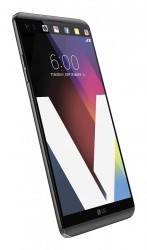
LG V20 review

One day we'd certainly remember the LG V20 as a pioneer in many respects. It sure is the first with Android 7.0 Nougat, but what else? Here's the full specs list to get you started.
Key features
- Aluminum AL-6013 body; MIL-STD-810G shock resistance
- 5.7" IPS LCD display, Quad HD resolution (513ppi); Secondary 2.1" display (160 x 1040px)
- Snapdragon 820 chip: quad-core Kryo processor (up to 2.15GHz), Adreno 530 GPU, 4GB of RAM
- 16MP (f/1.8) + 8 MP (f/2.4) main camera setup; OIS; laser autofocus; LED flash, 2160p video capture with lossless sound, SteadyRecord 2.0, 5MP (f/1.9) selfie camera (wide and normal modes)
- First phone with Android 7.0. Nougat with Optimus UI 5.0
- 32GB/64GB built-in storage plus microSD card slot
- Fingerprint sensor
- Cat. 12 LTE (600Mbps/150Mbps); Wi-Fi 802.11 a/b/g/n/ac; Bluetooth 4.2; GPS/GLONASS; NFC; USB Type-C port; IR blaster
- Quad DAC; 24-bit FLAC audio recording; B&O Play headphones bundled in some markets
- Removable 3,200mAh battery; Quick Charge 3.0
- No water proofing
- No wireless charging
Subscribe to:
Posts (Atom)
Related Posts
-
 Samsung Galaxy C7 Pro Samsung is upgrading its Galaxy C series with follow-ups to last year’s Galaxy C5 and C7 in the form of a C5 Pr...
 -
 A new report claims that the 2017 edition of the Samsung Galaxy J3 will go on sale in the US, via Sprint, on January 6. The story says th...
 -
 Samsung Galaxy A7 (2017) Renders Leak, 360-Degree Video Shows Smartphone In Action Renders of the next-gen Samsung Galaxy A...
 -
 Tablets might be well and truly on the decline, but that isn’t stopping manufacturers from releasing them. In fact, it looks like ...
 -
Codenamed Marlin and Sailfish There's now even more reason to believe that HTC is busy building both Google Nexus phones for 2016, a...
-
 Samsung went through hell after the recall and discontinuation of the Galaxy Note 7, which kept catching on fire. It all quickly became a ...
 -
 Samsuvng is expected to release the Galaxy S8 and S8 edge/Plus in mid-April. A new report claims the new smartphones could make an ea...
 -
 Unfiltered iPhone 7 hype There has been ample talk suggesting that the iPhone 7 will be a boring, iterative update, even thou...
 -
HTC 11 Image Leaks, Specs To Include Borderless Display, Qualcomm Snapdragon 835, 8 GB Of RAM, Price And More Details An image o...
-
Nintendo's "Super Mario Run" app is only available for iOS devices on Apple Store. Android users are warned against sideloa...