Nokia’s Android phones 2017: Rumors and news leaks

Nokia is back — and it’s back with a vengeance. The Finnish company finally launched its first Android-powered smartphone, the Nokia 6, but...

Showing posts with label apple. Show all posts

Thursday, December 15, 2016

How To Downgrade From iOS 10.2 To 10.1.1 Or 10.1: Quick Tips For iPhone And iPad Owners


How To Downgrade From iOS 10.2 To 10.1.1 Or 10.1: Quick Tips For iPhone And iPad Owners
Apple packed iOS 10.2 with a slew of new features, but if you're unhappy with it for some reason here's how to downgrade to iOS 10.1 or iOS 10.1.1. There's only a small window to downgrade, so time is of the essence. (Photo : Apple)
Apple released its latest iOS 10.2 with a number of new features, but some users may still want to downgrade to a previous version of iOS.
If the new iOS 10.2 features are not what you want, if the build is buggy on your device or if you have some other reason to drop it, you can downgrade to iOS 10.1.1 or iOS 10.1 for a limited time.
Apple doesn't officially support downgrading iOS updates, but there's a small window of a week or so after an update's release during which users can still downgrade. The option to downgrade to iOS 9 is long gone, but users can still roll back to iOS 10.1.1 or iOS 10.1 for now.
Get Ready
First of all, before rolling back to iOS 10.1.1 or iOS 10.1 you have to make sure you have the latest version of iTunes installed. If you're not sure, just open iTunes and head to Help > Check for Updates. If you're running an older version and an update is available, iTunes will offer instructions on how to get the latest version.
Once that's all set, make sure to back up all of your data via iTunes or iCloud, otherwise you could lose everything for good.
Lastly, before proceeding with the downgrade, disable passcode, Touch ID and Find my iPhone/ iPad
How To Downgrade From iOS 10.2 To iOS 10.1 Or iOS 10.1.1
To roll back to a previous iOS version, first of all download the iOS 10.1 or iOS 10.1.1 IPSW. Check this list to find your specific device and get the IPSW you need. Once you've downloaded the file, connect your device to a PC, fire up iTunes and select device summary for the connected iDevice.
Next up, hold down the Home and Power buttons simultaneously to get your iPhone or iPad into DFU mode. Release the Power button when the device shows the Apple logo on its screen, then wait for the Connect to iTunes logo to turn up. When iTunes displays a message with Device in Recovery, you can release the Home button as well.
From here on, you'll have a choice to either restore or update. You want to restore, so hold down the Alt key on Mac or the Shift key on a Windows PC while clicking Restore in iTunes. Find the IPSW file you downloaded, select it, follow the on-screen instructions and hit Install.
At this point, all you have to do is wait for iTunes to restore your iPhone or iPad to iOS 10.1 or iOS 10.1.1, depending on the version you've chosen to roll back to. When it's done, the iPhone or iPad will reboot and will show the Hello screen

Sunday, December 11, 2016

iphone 7 & 7plus hands on


Thursday, June 16, 2016

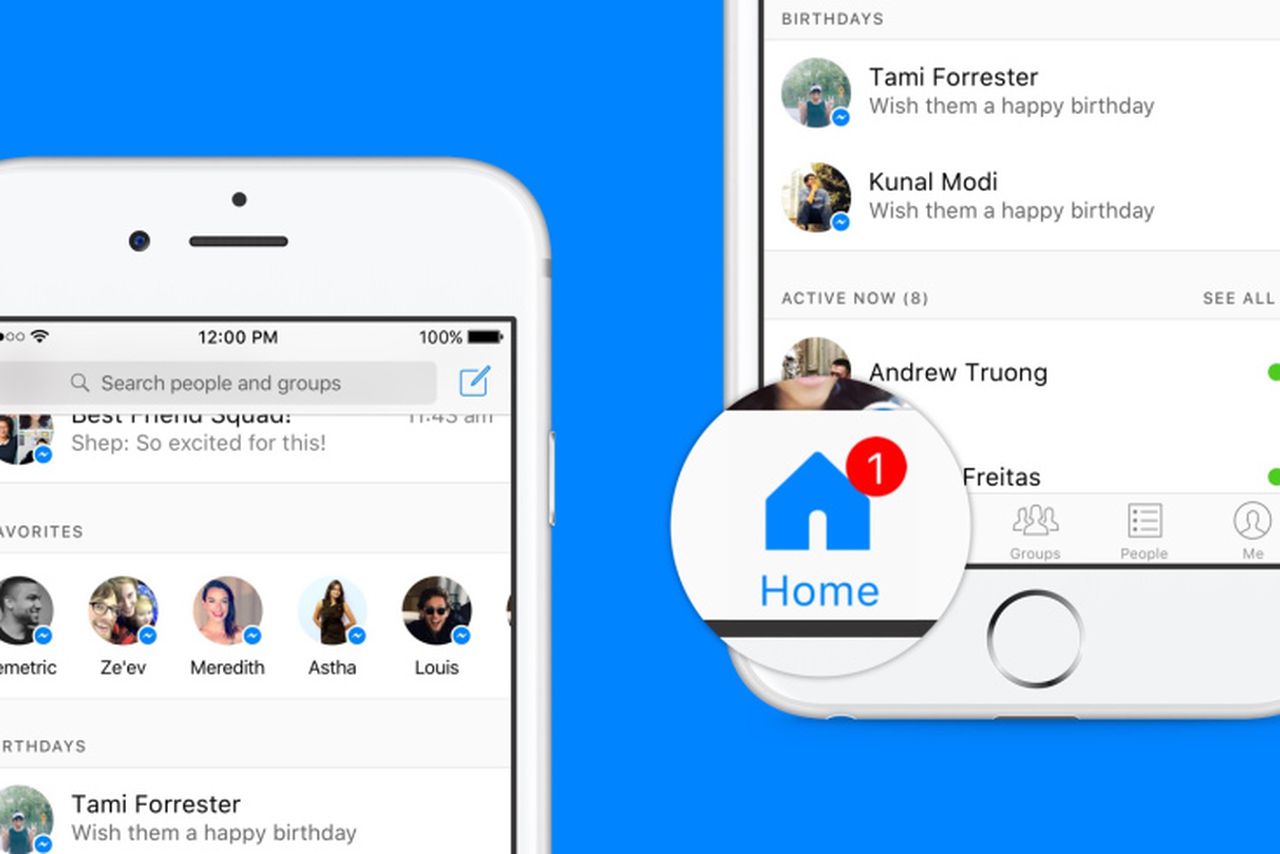
Facebook wants Messenger to 'reinvent the inbox' with a new Home screen

By Ashley Carman on June 16, 2016 10:07 am 5

Facebook is updating its Messenger app today to create a new homepage that will act more or less like an inbox. It’ll place recent conversation threads and users' most frequently contacted friends on the launch screen, which is now called "Home." Messenger currently displays threads like most other texting apps — in chronological order with the most recent conversation at the top of the screen.
"Up until now, most inbox experiences haven’t kept up with the new ways people connect," the company wrote in a blog post. "So, we’ve been thinking about how we can make it simpler and easier to find what you want to start a conversation."
\
David Marcus, VP of messaging products at Facebook, said the company is "reinventing the inbox," when he described the project at the WiredBusiness Conference today. In addition to a "Favorites" section, which shows the friends users message most frequently, there will be birthday reminders and an "Active Now" feature that shows who's online.

Sunday, May 8, 2016

iOS 10 release date, news

Apple's iOS 10 update is an iPhone and iPad milestone

      iOS 10 is now expected to make its debut next month at the company's WWDC keynote with new features for Siri, HomeKit and Apple Music. Here's the latest news.

Apple's iOS 10 update is the milestone software version for the iPhone and iPad, and its release date is currently one months away, according to the company's routine schedule.

Downloading the iOS 10 beta this summer and the final release a few weeks later won't end up being a big scheduling surprise, but where Apple takes the mobile operating system is still a mystery.


Apple is preparing the redesigned iPhone 7, according to the latest leaks, and that means the interface may take on a few surprises. Here's what we've heard and want.

iOS 10 release date

iOS 10 release date news beta and rumors
Apple is reportedly testing iOS 10 right now, meaning it's on track for another June release date at the company's Worldwide Developers Conference event, WWDC 2016.

Siri let us know that the keynote date is June 13. That's when official iOS 10 announcement will happen with an introduction by Craig Federighi, Apple's senior vice president of software engineering.

The iOS 10 beta should be available to developers immediately, while a public beta is probably launching in July, just as it did with iOS 9. After all, last year's public beta was a big success for Apple judging from the smoother sailing of iOS 9, and it continues to be with surprise iOS 9.3 features.

If you decide to wait for the final version of iOS 10, it'll take a while longer due to additional bug testing by developers and faithful Apple fan trying out the beta. A stable version of iOS 10 should launch alongside the new iPhone 7 in September.

Wednesday, May 4, 2016

Apple CEO Tim Cook said about iPhone 7


 Unfiltered iPhone 7 hype


There has been ample talk suggesting that the iPhone 7 will be a boring, iterative update, even though this year's phone is due to be a major refresh that happens every two years. Not so fast.

iPhone 7 news
Great expectations for iPhone 7
"We're incredibly excited about things we're working on. Incredibly excited," said Cook after Cramer asked about the iPhone 7 directly.

"We've got great innovation in the pipeline, new iPhones that will incent you and other people that have iPhones today to upgrade to new iPhones."

We're going to give you things that you can't live without that you just don't know you need today
Cook didn't go into detail on the new iPhones (shocker), but we've been hearing plenty of rumors about a dual-lens camera for the iPhone 7 Plus, reworked antenna bands and no headphone jack. Of course, there's hope among Apple faithful that's there's more to it than that.


"We're going to give you things that you can't live without that you just don't know you need today," Cook boasted when talking about future iPhones.

"That has always been the objective of Apple. To do things that really enrich people's lives. That you look back on and you wonder 'how did I live without this?'"

In other words, Cook promised that the next iPhone won't be boring, contrary to the ho-hum predictions of newsmaking analysts. At the end of the day it's his job to keep the hype train rolling, and we'll likely have to wait until September to know who's right.

By Matt Swider  Techreader

Related Posts

VIDEO GAMES